Search Engine Optimization – 2026

Search Engine Optimization Guide for Professionals (2026)
Table of contents: Introduction
SEO Guide for Professionals (2026)
An SEO guide for professionals. Updated 2026. For when beginner guides no longer cut it and you want to take your skills to the next level
- Deeper principles of search engine optimization
- Actions with practical examples

What do I think search engine optimization is?
Every search is a question. The top result is the one that answers it best
- Flights to Helsinki?
- Lunch on Hämeenkatu?
- Inspection prices?
- Lidl opening hours?
- Nike running shoes?
Whoever answers the search engine’s question best appears first. The purpose of search engines like Google is to provide the best possible result for each query.
For this reason, Google only shows results in the top positions that have been optimized for search engines.
SEO techniques can be divided into three areas:
- Technical SEO
- On-page SEO
- Off-page SEO

Google’s three ranking criteria for SEO
In March 2016 Google revealed that search results are determined by three main factors.
- External links and the site’s reputation elsewhere on the web
- Page content — text, load speed, user experience
- RankBrain
What’s RankBrain?
In 2013 Google disclosed that it handles 100 billion searches per month and that it didn’t understand 15% of queries. That means Google couldn’t answer 500 million searches a day.
This is why RankBrain was developed — its existence was confirmed in 2015.
RankBrain is an AI that uses machine learning.
Machine learning = you give a machine data and constraints. The machine then draws conclusions from that information.
For example, the framework for a chess-playing AI is the rules of chess. A chess AI simulates billions of moves and picks the ones that work best.
RankBrain has two jobs:
1. Figure out what the searcher meant
2. Measure the searcher’s experience
In the past Google read the text on your blog post and tried to infer its topic by counting how often certain words appeared.
Once it guessed the topic, the page was slotted into the relevant search.
That’s history.
The old approach had a problem: for example, a search for “verkkokauppa” could mean
- the company verkkokauppa.com
- how to build an online store
- what does “verkkokauppa” mean?
…or something else.
RankBrain solved this by looking at past searches and which links people clicked after searching. If users went as far as the second page of results and clicked a link there, that site would be ranked higher the next time.
Today Google can, in Finnish too, often guess very precisely what you meant by your search — even if the page’s text doesn’t exactly match your query.

RankBrain also measures user experience, and it works like this
Google shows the search results it thinks are most relevant. After delivering results, it watches what you do.
FOR EXAMPLE
- You run a search and click the first result.
- You don’t find what you were looking for, so you hit the back button and return to the search results.
- In that case Google receives a signal that the first result wasn’t the best match for that query.
- You click the second result and stay to read the content.
- Google receives a signal that the second result was better and boosts its visibility for that search.
Technical SEO
SEO guide part 1:
The technical side is the foundation of SEO. This is where a site’s loading speed and usability are optimized.
Websites need to be technically sound to appear in search engines. In practice that means a site must:
- Load quickly
- Work on every device — especially mobile!
- Use readable fonts. Not too big, not too small.
- Be readable by bots
Optimizing loading speed
If a site doesn’t load quickly, it will never show up in search results.
In 2020 Google announced it would adopt a more robust way to measure page speed and user experience.
Rather than relying on simple load time, Google now uses more advanced metrics:
- LCP = Largest Contentful Paint – How long until the main content is visible on the screen?
- FID = First Input Delay – How long until the page responds to user interaction?
- CLS = Cumulative Layout Shift – How long until the layout stops shifting?
Each of these metrics and how to optimize them are explained below:

Only mobile matters
When you optimize site speed, focus on mobile only
In 2019 Google announced that its indexing bot no longer uses desktop versions of websites.
Chances are most of your visitors use mobile devices too. Worldwide, mobile connection speeds are painfully slow.
- According to Google, the average mobile page load time is 15.3 seconds (source)
- Each extra second of load time can reduce your website’s conversions by 20% (source)
So, when you use Google’s PageSpeed test, look only at the mobile tab

Check your site’s loading speed in Google Search Console
Google Search Console is an excellent SEO tool because it shows any technical issues on your site.
Log in to Search Console and add your site.
Go to the "Page Experience" section to see how Google has rated your site.
If there are loading problems, you’ll find them there.
Google often also explains how to fix any issues.

How do you optimize LCP?
LCP (Largest Contentful Paint) is a loading-speed metric that measures how long it takes for the main content of a page to load
The recommended LCP load time is under 2.5 seconds.
If load time exceeds 4 seconds, it’s quite possible Google won’t show the page in search results at all. The site is simply too slow to be displayed.
How to optimize LCP
- Optimize images
- Optimize videos and other large files
- Optimize CSS and JS files
Items are explained in more detail below:
Image optimization
Images are the most common cause of slow page loads. They can make up over 90% of a page’s load weight.
Images are huge. A photo taken with a phone can be several megabytes, while an image on a website should usually only be a few kilobytes.
Fortunately, shrinking and compressing images is easy with external tools.
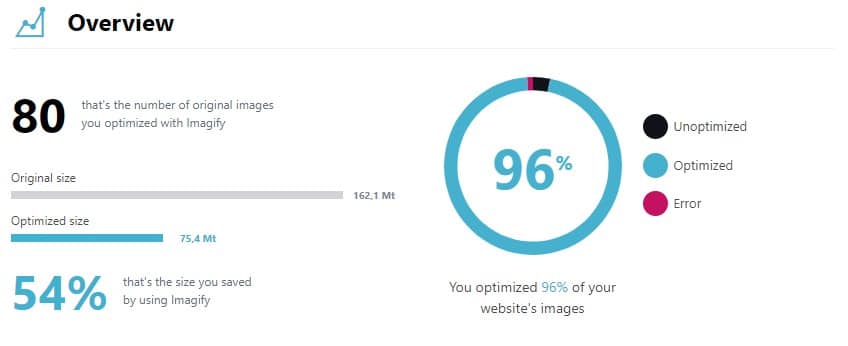
Whether you use WordPress or another platform, I recommend using Imagify — automated image compression software.
With Imagify you can compress your WordPress site’s images automatically with one click.
Besides compression, you should also consider image formats.
- PNG files are often very large
- GIF files are lightweight but low quality
- JPG files offer a good balance of quality and size, but don’t support transparency
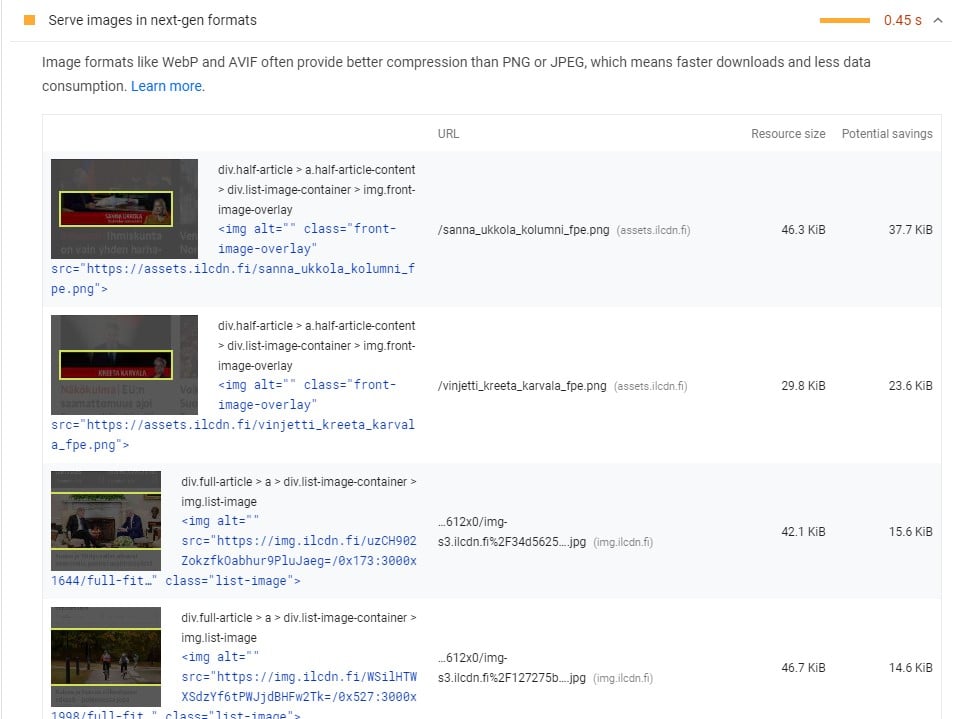
Modern websites serve images in .avif or .webp formats. These newer formats outperform the familiar JPG, GIF, and PNG formats.
If you enable Imagify in WordPress, the tool will automatically convert images to .webp format.
Optimizing videos and other files
An embedded YouTube video brings a lot of extra files to your site
Embedding videos from a streaming service like YouTube is heavy because the service has to load its own player along with the video.
Usually that means a ton of JavaScript files and a few images are loaded with the video.
The easiest fix is to load videos “lazily” — using lazy loading.
Lazy loading means the browser only loads the video when the user scrolls to it. The video isn’t loaded together with the rest of the page.
If you use WordPress, the easiest way to enable lazy loading is to install WP Rocket on your site.

Optimizing CSS and JS files
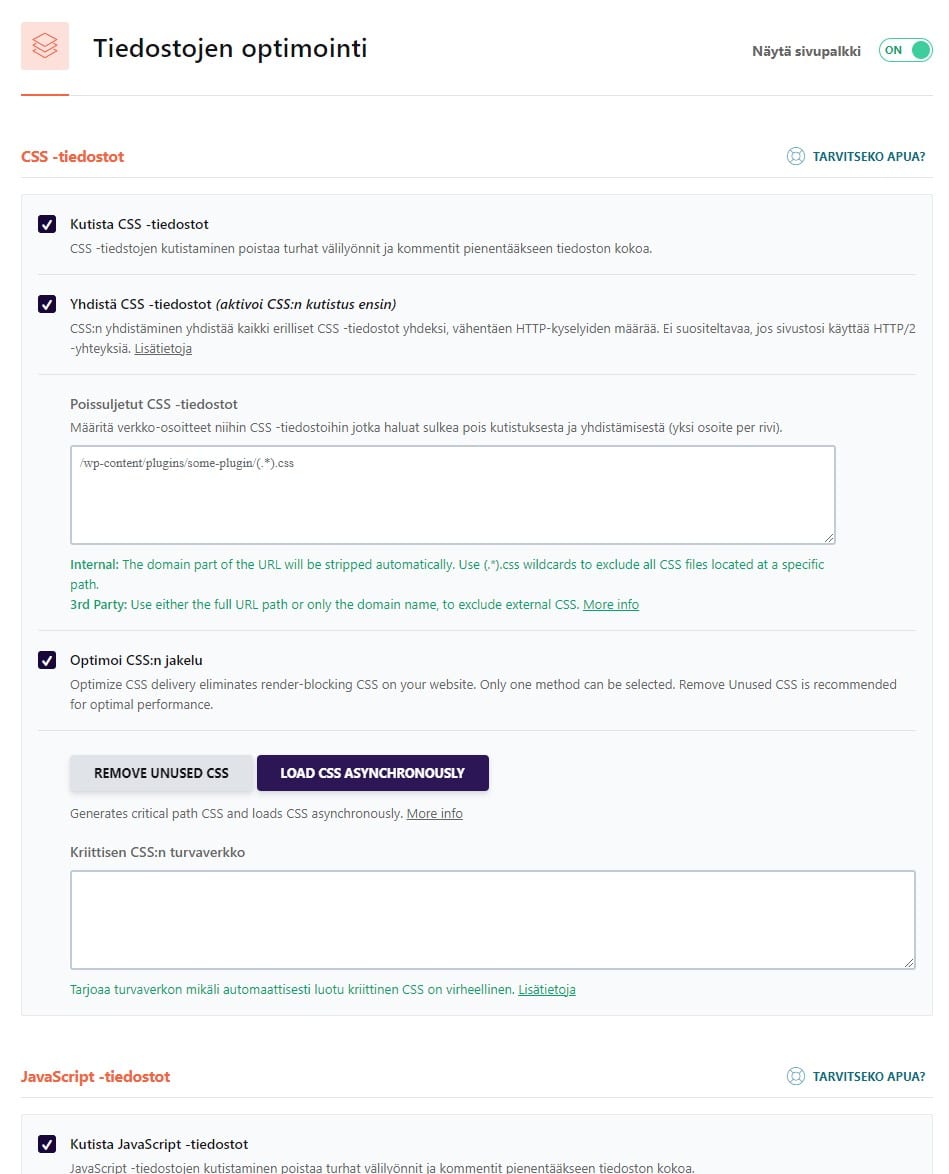
A website’s CSS (stylesheets) and JS (JavaScript) files can slow down page loading.
Especially in poorly coded WordPress themes, these files can be a massive problem. Theme authors often pack in thousands of features, and each feature adds to file size and slows page loading.
On WordPress sites, file optimization is made easy thanks to the WP Rocket plugin.
FID performance optimization
FID (First Input Delay) measures the time from a user’s first interaction with a webpage to when the page actually responds to that input.
FID should be under 100 ms.
If FID is over 300 ms, the site receives a failing grade and may not appear in Google (source).
It’s rare for FID to be slow because it’s usually caused by heavy JavaScript tasks, which are uncommon on typical websites.
Fixing FID often requires deep programming expertise, so I won’t cover it in detail here.
Instead, I recommend reading Google’s official guidance on the topic
CLS performance optimization
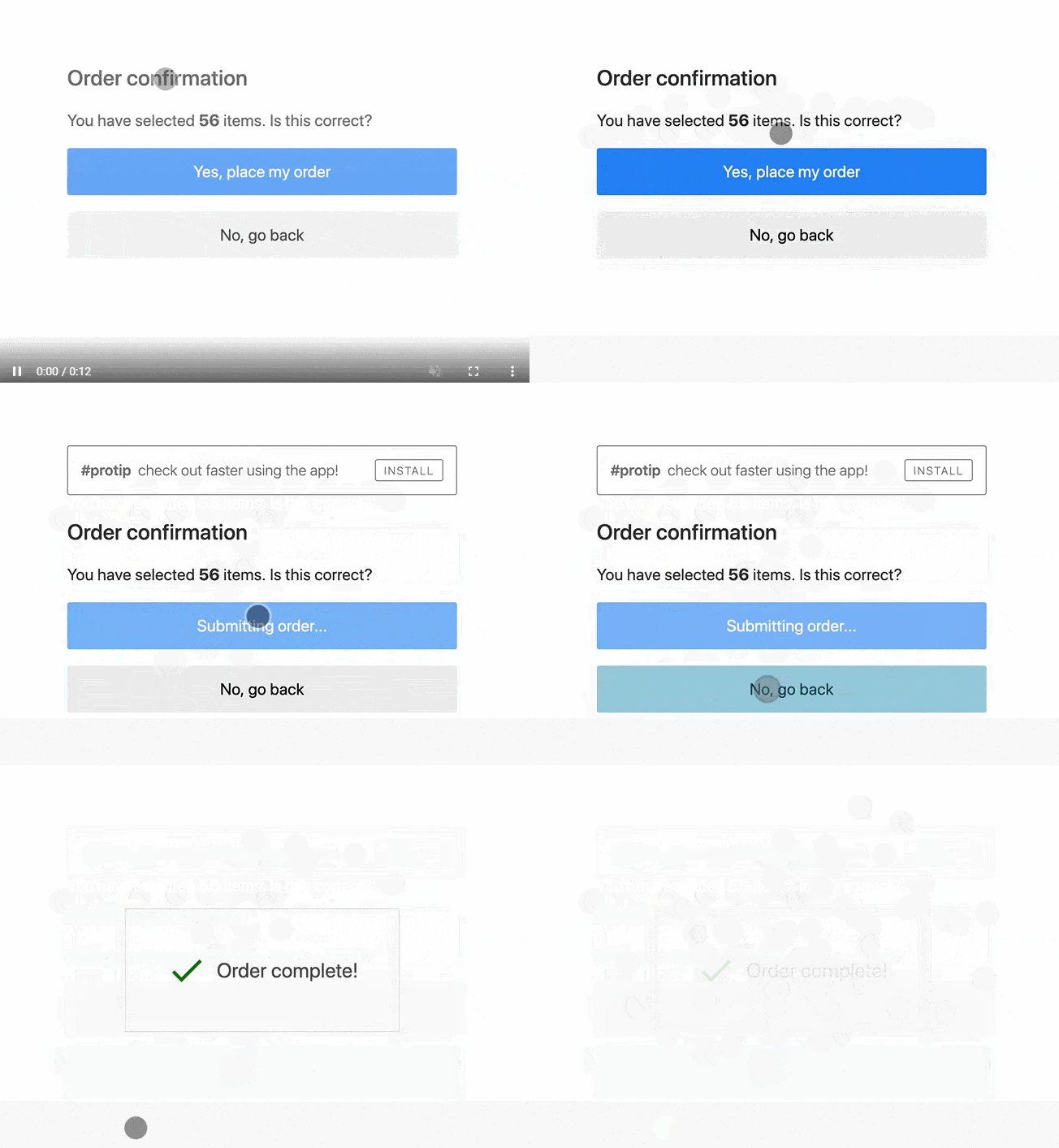
CLS (Cumulative Layout Shift). Often when a webpage loads, its layout shifts a bit. Images load after text, elements jump around, etc.
CLS measures how long it takes for a page to stop shifting and become usable.
CLS should be under 100 ms.
If CLS is over 250 ms, the page receives a failing grade and may not appear in Google (source).
There’s no single guide that fixes every CLS issue — each problem needs to be addressed case by case.
Hire me or another developer if you need help optimizing CLS.
On-site Search Engine Optimization
SEO Guide — Part 2
Once the foundation of the site — the technical side — is in place, you can focus on the most important part of SEO: the text content.
- Site structure. Each search term should have its own subpage.
- Enough text. Each important page should have at least 300 words.
- Text is broken up with headings. Nobody likes a wall of text.
- The target keyword appears in headings and the page URL.
- Image ALT texts. ALT texts help your images appear in Google Image Search.
- Internal links. You should be able to navigate forward from every page.
- External links. Each page should link out to another site.
- Meta description. The meta description shows up in Google results and can affect click-through rate.
Site structure
All content should be no more than three clicks away
Many sources say the “three-click rule” isn’t actually true, but I think it’s a very useful guideline.
The idea is that any content should be reachable within three clicks.
That said, if you have thousands of pages, you shouldn’t force everything to be within three clicks.
- User-friendly
- All content is easy to find
- Google can find the content easily
At least 300 words of text
In SEO circles it’s been a rule of thumb that a page should have at least 300 words so Google’s bot can understand what the page is about.
Many large companies have analyzed millions of Google searches and found that longer content tends to perform better in search results.
People like longer texts as long as they’re high quality. After all, people do read books.
300 words is the minimum, but studies have shown that pages that rank well on Google are typically 2,100–2,400 words long.
According to a HubSpot study from 2021, the ideal blog post length for SEO should be 2,100-2,400 words.
https://www.searchenginejournal.com/ideal-blog-post-length-for-seo/255633/
Text is broken up with subheadings
Nobody likes walls of text. Everyone loves headings.
People read text online differently than they do in books.
- First the eye scans the images
- and then the headlines.
- If the text under the headline looks interesting, the reader moves on to the paragraph text.
Google also understands a page’s topic better when you include the search term directly in the page’s headings.
Headings help keep a reader’s attention longer. Longer visits can improve your visibility in search engines.

Key search term appears in headings and the page URL
Using your target keyword effectively in the page URL and headings is important for search visibility.
URL rules:
- Include the keyword in the URL so it clearly reflects the page’s content.
- Keep the URL short and concise, but make sure it contains the keyword.
- Avoid unnecessary characters like punctuation and special symbols.
- Use hyphens instead of underscores to separate words so search engines can recognize individual terms more easily.
Example: www.example.com/keyword-product
Heading rules:
- Use the keyword in the page’s main heading (H1) so it clearly communicates the page’s topic and is search-friendly.
- Try to place the keyword as close to the beginning of the heading as possible, but make sure the heading remains natural and appealing.
- Use the keyword in subheadings (H2, H3, etc.) when it fits naturally and suits the content’s context.
- Avoid overusing the keyword in headings to prevent search engine penalties.
Remember that content quality and user experience come first. SEO is important, but don’t let it reduce your site’s usability or the value of your content for users.
Image ALT Texts
Optimizing alt text is important for both SEO and website accessibility.
- Describe what’s in the image: Alt text should convey the image’s content for people who can’t see it—such as screen reader users or when the image fails to load. Write a concise, clear description that covers the image’s essential information.
- Use keywords where appropriate: If it fits naturally and is relevant, include keywords in the alt text. Don’t force keywords that don’t match the image.
- Keep it short: Aim for under 125 characters so screen readers can read it easily. Don’t sacrifice clarity or informativeness just to keep it brief.
- Don’t repeat nearby text: Avoid duplicating the image’s caption, heading, or other nearby text. Alt text should complement and add useful information, not repeat what’s already there.
- Avoid unnecessary words: Don’t include words like "image" or "picture" in the alt text—screen readers already announce that it’s an image.
- Use empty alt text for purely decorative images: If an image is only decorative or conveys no information, use an empty alt attribute (alt="") so screen readers skip it.
Good alt text helps improve your site’s search visibility and makes it more accessible to a wider range of users.
Internal links on the site
Internal linking is an important part of search engine optimization (SEO) because it helps improve site structure, user experience, and the value of your content.
- Help with indexing: Internal links help search engines index your site’s content more effectively. They guide crawlers from page to page and help them understand the site’s hierarchy and the relationships between pages.
- Improve site structure: Good internal linking helps create a clear, logical site structure. This makes navigation easier for both users and search engines and makes the site more organized.
- Distribute link equity: Internal links help distribute link equity (link juice) across different parts of your site. That means when one page gets external links, that value can flow through internal links to other pages and boost their search visibility.
- Reduce bounce rate: Internal links can keep users on your site longer by directing them to additional relevant content. This can lower bounce rate and improve how search engines view your site’s performance.
- Enhance user experience: Useful, informative internal links help users discover more information on topics that interest them. This improves user experience and can increase your site’s perceived value to search engines.
Using internal links effectively requires a deliberate strategy and a solid site structure.
Make sure you link to relevant content and use descriptive, natural anchor text.
Don’t overdo internal linking, though — avoid harming the user experience.
External links. Link to other websites.
Each page should link out to another site
It’s a good idea to include links from your site to other websites, as long as they’re relevant and useful to your visitors.
Linking to high-quality, authoritative sites can help your SEO because it boosts your site’s credibility and perceived value to search engines.
When adding links, keep these points in mind:
- Relevance: Only link to sites that relate to your content and genuinely benefit your visitors.
- Quality: Link to reputable sites with strong standing in their field.
- Naturalness: Don’t overload a single page with external links — that can look spammy and hurt search visibility. Place links naturally within your content.
The "dofollow" and "nofollow" link attributes also matter for SEO.
"Dofollow" links tell search engines you trust the linked site and can pass value to it.
"Nofollow" links don’t pass value, but they’re useful when linking to ads or other sites you don’t want to endorse.
Ultimately, remember that SEO’s primary goal is to improve the user experience.
Links shouldn’t be added just to boost search rankings — they should provide real value and helpful information to your visitors.
Meta description
A meta description is a short text that describes a webpage’s content and purpose to search engines like Google.
Writing a meta description matters because it affects how appealing your page looks in search results — which can boost your search ranking and bring more visitors to your site.
When writing a meta description, pay attention to the following:
- Length: A meta description should generally be around 150–160 characters. If it’s too long, search engines may truncate it and your message won’t come through in full.
- Relevance: Make sure the meta description accurately reflects the page’s content and purpose. Use keywords you think are important to users, but don’t stuff them unnaturally.
- Appeal: Craft the meta description to encourage users to click the result and visit your site. Highlight the page’s value and benefits for the user.
- Clarity: Use clear, easy-to-understand language so users quickly grasp what the page offers.
To add a meta description to an HTML document, include a element in the head like this:
<head>
…
<meta name="description" content="Here is an example meta description that explains the page’s content and purpose.">
…
</head>
Replace the content attribute value with your own meta description.
Off-page SEO for Your Website
SEO Guide Part 3
Links from other websites — backlinks and your site’s reputation.
It’s 2026, and external links still affect a site’s visibility in search.
Once you’ve taken care of all on-site SEO, you can focus on getting links from other sites.
Google, however, advises against manufacturing links; instead it recommends creating content so good people link to it naturally.
That’s the whole point of external links.

5 ways to get high-quality backlinks
A link from another website to yours
Here are five ways I acquire backlinks myself
- Links from other websites I own
- Links from clients’ websites (sites I created)
- Guest posts on partner blogs
- Providing testimonials for partners’ and friends’ businesses
- Buying links with money
What is a quality backlink?
One quality backlink is worth more than 10,000 bad ones.
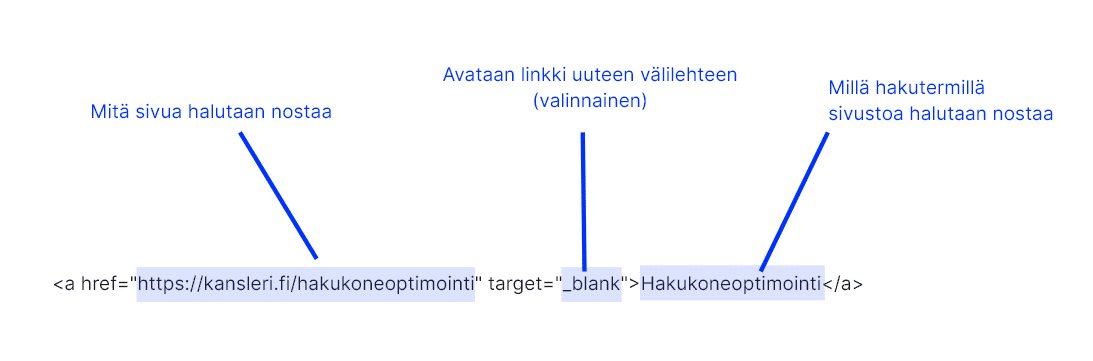
A good backlink consists of the following
- The link is in text form
- The anchor text contains the keyword you want the site to rank for
- The link does not have a nofollow tag
What is a bad backlink?
Image links are worthless

You already appear on Google for your own name
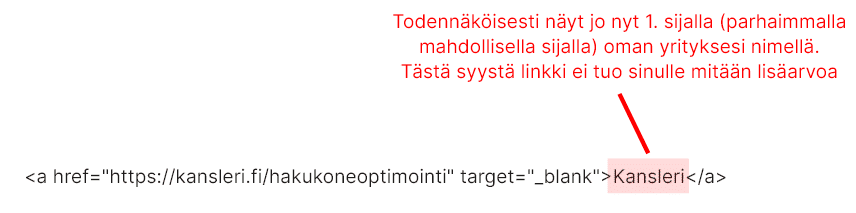
A nofollow link is worthless. All social media links and comment fields include the nofollow tag.
- rel=”nofollow”: Use this attribute when you want to link to a page but don’t want to imply any kind of endorsement (Google blog)

Search engine optimization for websites I build for clients
I always apply the following SEO measures to the sites I build
- Mobile optimization (improves user experience)
- Sub-second load times (improves user experience)
- Writing meta descriptions and titles (improves click-through rate from search)
- Submitting sitemaps to Google (speeds up indexing)
- Installing Rich Snippets (Schema) data (makes search results look nicer)
The following services are available for an additional fee
- Editing or creating website text content
- Building external backlinks
- License fees for SEO monitoring tools
Read more about WordPress websites.
Need help?
Book a free SEO check: in a 60-minute video call we look at how your website shows up on Google in Finland and what to fix first.
Free SEO check
A 60-minute Google Meet call: we look at how your website shows up on Google in Finland.