
Search Engine Optimization - A Beginner's Guide (Updated 2026)
SEO - A Beginner's Guide tells you everything a beginner needs to know about search engine optimization.
Guide updated for 2026 (05.03.2026). New: AI and SEO.
Reading time: About 15 minutes - Difficulty level: easy
Who is this SEO guide for?
The SEO guide is for those to whom search engine optimization is a completely unfamiliar concept.
You don't need to know anything about SEO to get started.
The guide is built on 10+ years of SEO experience and updated to reflect the techniques of 2026.
How does AI change SEO? Find out in this guide.

What is search engine optimization?
Search engine optimization is a way to improve a website's ranking in search engines' organic search results.
Stop for a moment to think about how powerful a tool search engine optimization can be. With search engine optimization, you can advertise your products for FREE right when your customers need them.
Search engine optimization is the most cost-effective form of marketing in the world.
It's like being featured on the front page of Hesari, for free, every day.
A few years ago, search engine optimization got a bad reputation when optimization professionals used techniques that could trick a website to the top of Google, for example, by spamming a certain word multiple times in the website's text content.
Google and other search engines noticed the trickery and changed their algorithms so that cheating is almost impossible. Those who had achieved results by cheating lost their search visibility completely.
Today, search engine optimization is a way to build and modify websites in accordance with search engine guidelines.
Search engine optimization measures can be divided into two different categories.
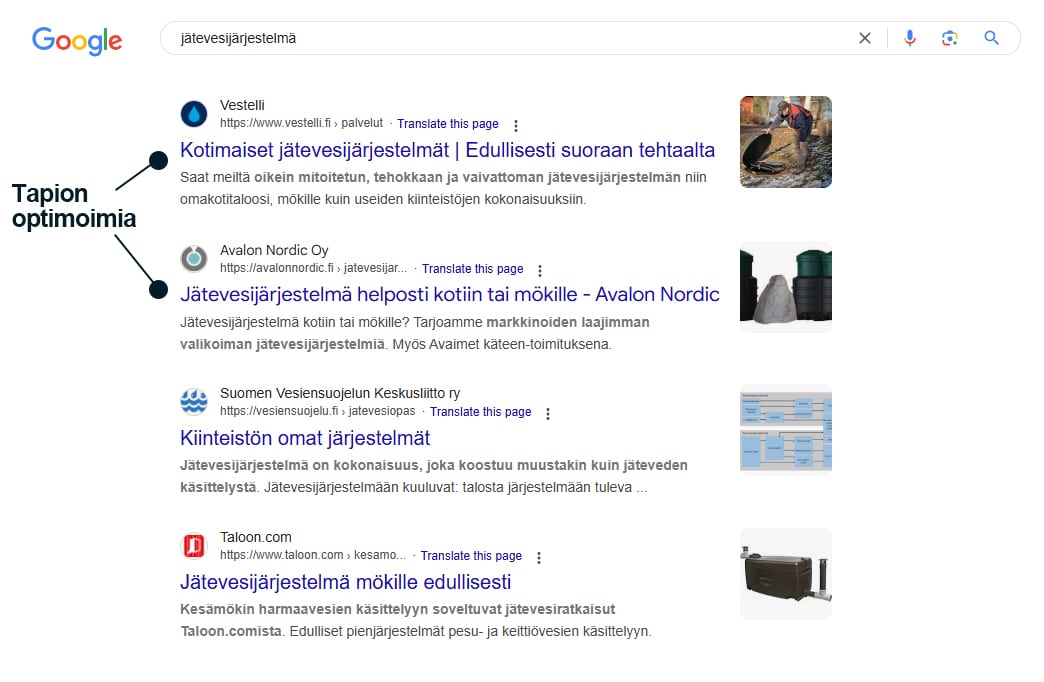
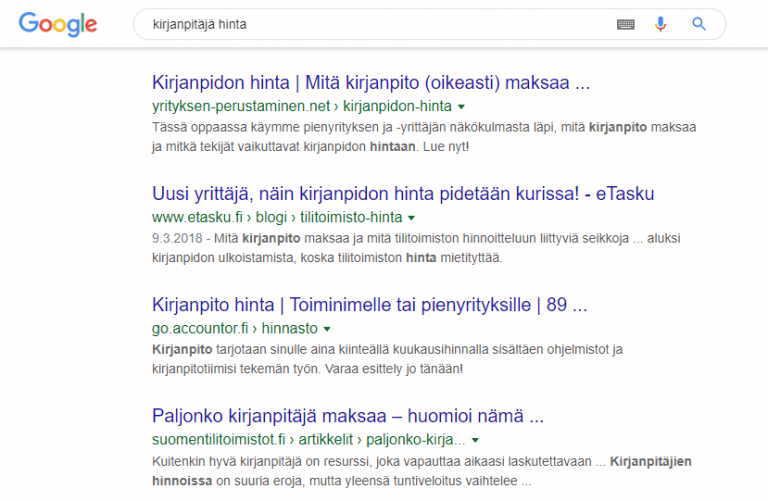
Search engine optimization actions can be divided into two different categories.
1. On-page optimization
Search engines aim to display the most relevant results possible for every search.
With on-page optimization, pages are targeted towards specific search terms.
On-page optimization also includes building the website so that it functions and loads quickly on all possible devices and screens.
- High-quality content
- The content answers the user's search query
- The content provides value to the reader
- The content is not duplicated (AI-generated content is almost always duplicated)
- The content is structured with headings (h1-h6)
- Title and meta tags reflect the content and invite clicks
- Visuals: The content is supported by illustrations or videos
- Clear URL address
- Image alt texts
- Technically functional content
- The content is secured with an HTTPS connection
- The content scales to every device's screen (especially mobile) and is easy to read
- The page loads quickly

2. Off-page optimization
Off-page optimization improves your ranking in search results. Search engines evaluate how trustworthy a website is by calculating how many other trustworthy websites link to it.
Off-page optimization can also include the reputation of the company or website. If many people search for your website by its name in a search engine, for example due to a TV commercial, search engines can increase your website's trust rating.
- Links point to the website from other sites (read here what a good link is like)
- Optional but helpful factors:
- The website has reviews on Google
- The website has been added to Google My Business
- The website has social media visibility

Why does my website need search engine optimization?
The purpose of search engine optimization is to format your website and content in a way that both users and search engines understand.
Although search engines have evolved tremendously over the years, they still need help. Search engine optimization helps the search engine figure out what the page content is about and who the content is useful for.
Imagine uploading a picture of a black dog to the internet. The human mind immediately understands that it might be a Labrador Retriever playing in a park. A search engine, on the other hand, cannot understand the image in the same way. For this reason, it is important to use search engine optimization to explain to the search engine what the image represents.
After the explanation, the search engine can list the image in its relevant searches, such as ”Labrador Retriever in the park”.
By understanding the techniques and limitations of search engine optimization, you can build great visibility for your website.

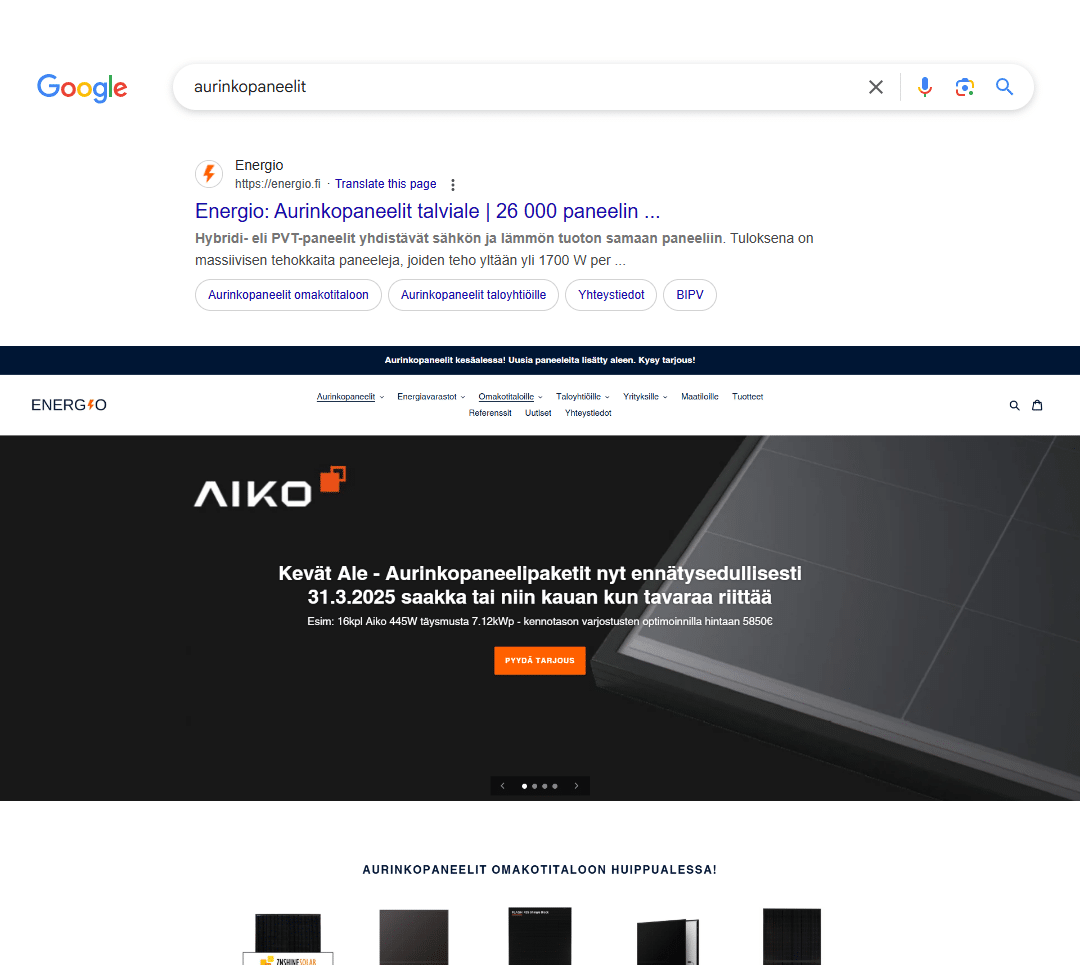
Real-life example: Energio ranks #1 for the keyword "solar panels"
SEO pricing: Implemented as part of outsourced digital marketing.
Thanks to the SEO project, Energio rose to the number one spot on Google for the keyword "aurinkopaneelit"
The position brings thousands of visitors and dozens of quote requests every month.
Work done
- Rebuilding the entire site from Shopify to WordPress
- Hundreds of backlinks from relevant sites
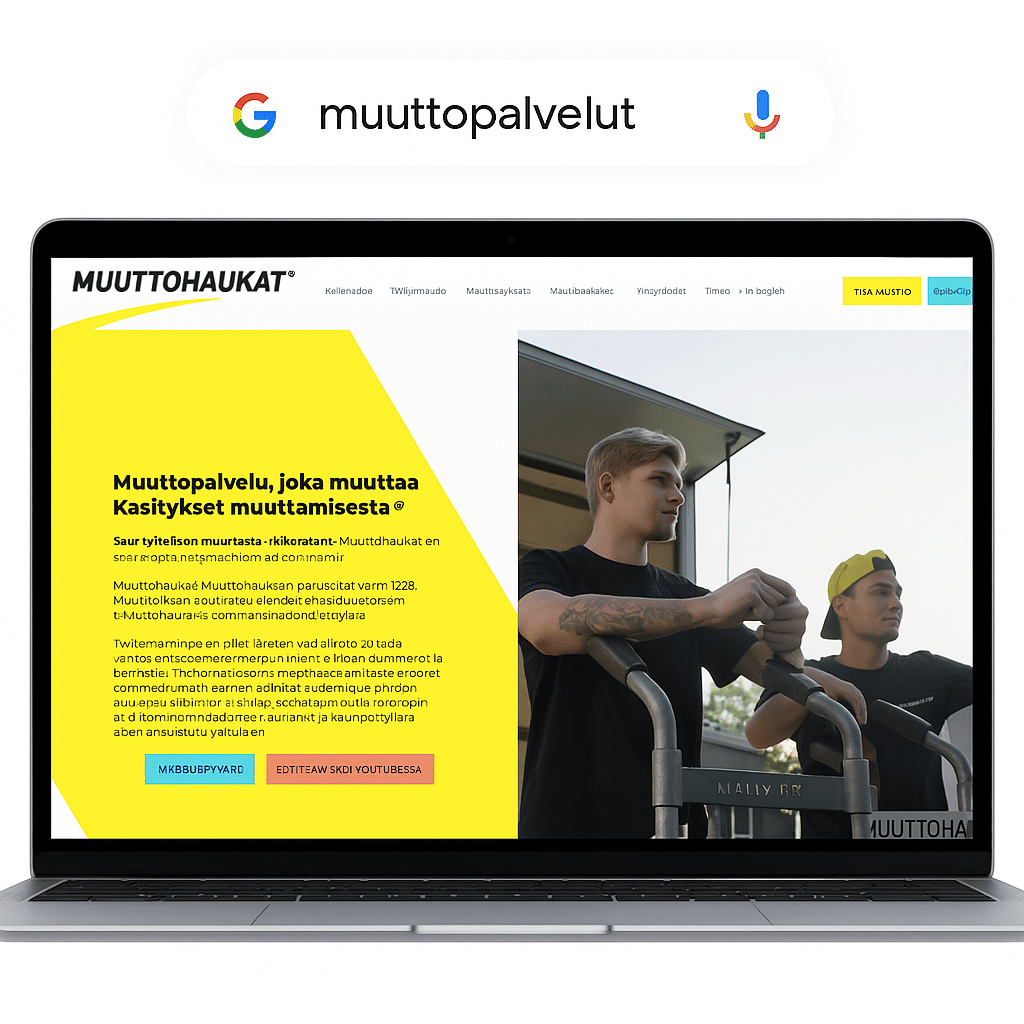
Real-life example: Muuttohaukat and "moving service"
SEO pricing: Implemented as part of outsourced digital marketing
Muuttohaukat rose to the top positions on Google after search engine optimization
A site-wide SEO project was carried out for Muuttohaukat, which made the site's visibility skyrocket in search results.
Among the greatest achievements was a top-3 ranking for the keywords
- Muuttopalvelut
- Muuttopalvelu
- Muuttofirma
- Muutto
Can I do search engine optimization completely by myself?
The world of search engine optimization can be complex, but often just knowing the basics is enough to achieve great results.
Even the smallest amount of knowledge about the basic principles of SEO can be a decisive factor in visibility. The importance of search engines in the world is becoming so great that I would say the basics of SEO are already a matter of general knowledge.
In answer to the question I posed: Yes. You can do search engine optimization entirely by yourself if you can spend the time to learn it and continuously fine-tune it.
There are hundreds of thousands of companies worldwide offering SEO services. If you are considering hiring an SEO specialist, I recommend choosing a company that has concrete proof and references in search engine optimization.
What does Google say about AI-generated content?
AI-generated content is a big problem for Google. Anyone can generate thousands of blog articles in a few minutes. How does Google know which of these articles is the best for each search?
Quality above all: Google does not penalize a site simply because its content is produced by AI (this guide too is partly made with AI), as long as it is high-quality, useful, original and does not aim to manipulate search results.
-
AI-generated low-quality, manipulative, or spammy content can lead to penalties and lower rankings – in exactly the same way as similar content produced by humans.
So you can use AI for content creation as long as you ensure that the content brings some value to the reader.
For example: This article (link) ranks 1st for the search "pikkujouluideoita työporukalle" and is made 100% using AI.
The reason why it ranks 1st is that the ideas are actually quite good.
AI has no experiences or imagination of its own
It can only tell things that someone else has already told somewhere on the internet.
The best SEO text brings some new perspective or personal experiences into the article.
What is indexing?
In March 2026, Google published a new documentation guide on how Google's crawlers work. The document is titled “Things to know about Google’s web crawling.”
-
What does crawling mean?
In short: crawling is the way Google "sees" the internet. -
Google has multiple crawlers
Different bots handle different tasks. -
Google performs continuous recrawling
This is how Google finds updates and can display the freshest search results. -
Frequent crawling is a good sign
-
Crawling has increased over time
Website structures have become more complex. -
Google optimizes crawling automatically
-
Google does not go behind paywalls or subscription content without permission
-
Site owners can control crawling
For example, using the robots.txt file and other settings. -
Google's robots respect website settings
They follow the rules defined by websites regarding content usage.
One of the key takeaways from the document is that frequent crawling of a site is generally a positive signal.
Google writes:
“If we crawl your site frequently, it's a sign that your pages have fresh or highly relevant content that people want to find. It also shows that our systems recognize this demand.”
A good example of this is an online store. Google crawls online stores frequently so that up-to-date prices, offers, and stock status are shown in search results.
Why is this important?
Indexing is a fundamental prerequisite for search engine optimization (SEO). If Google cannot index your site correctly, your content cannot appear in search results.
The purpose of this guide is to help website owners understand:
-
how Google's indexing works
-
why pages are indexed at different frequencies
-
what things can be done to improve the site's crawlability.
Do I need to read the entire guide?
If you are serious about improving your website's search engine visibility, but are completely clueless about SEO in general, I recommend reading this guide from start to finish. I tried to make the guide as easy to read and concise as possible.
Every section of the guide is an important step in search engine optimization.
Google's recommendations for search engine optimization
Google does not reveal much about how it works. However, here are a few recommendations from Google on how to improve rankings on Google.
- Make websites for people, not for robots or search engines.
- Do not try to deceive users or show different content to users and search engines.
- Create a website with a clear hierarchy and text-based links. Every page on your site must have at least one text link. Search engines cannot use search forms.
- Write unique and information-rich text. Avoid spelling errors.
Bing's recommendations for search engine optimization
Guidelines provided by the Bing search engine to improve rankings in its search results. Many of Bing's recommendations are the same as Google's; these have been omitted from the list below.
- Make sure your site's content is not hidden inside "rich media" such as Flash or Javascript.
- Create new content regularly
- Do not embed important text in images.
How do people use search engines?
People use search engines for different purposes. These searches can be divided into three different groups.
- Searching to do: I want to do something, like buy a plane ticket or listen to music.
- Searching for information: I want to know when a band has a gig or what is the best restaurant in Tampere.
- Navigation: I want to get to a specific place on the internet, like Facebook or the homepage of Iltalehti.
When a user types a search into a search engine, are they satisfied with the search results? This is a question that search engines try to answer millions of times a day. The main task of search engines is to provide relevant search results to their users. So ask yourself: What is my target audience looking for, and how can I deliver it to them?
What is my target audience looking for, and how can I deliver it to them?
Do a test: Search Google using keywords from your own industry and see what kind of content your competitors have written on their pages.
SEO Guide Chapter 1: On-page SEO
On-page optimization refers to the actions taken on the website itself. In this section, we will go through the most important ones. I tried to write each point as clearly as possible.
1.1 Keyword Research: Find out what terms people search for on Google
Before actual search engine optimization, it is a good idea to check what kind of searches your target audience uses to find your services. For this, use the Google Keyword Planner.
With the tool, you can test the search volumes of search terms and choose the right wording. To start, give the tool one or more search terms. The tool will then provide estimates of how much the term is searched for and suggestions for other similar searches.
Make a list where you write down a search term (as a keyword) for each page of your website under which you would like the page to appear in search engines. However, the best search term is not necessarily the one with the highest search volume. Choose a search term that you think will best reach your target audience. Also, remember to use the same search term only once per page. So, do not optimize two different pages for the same search term.
Always define a precise location. For example, if you aim to appear in the search for ”Plumber Tampere”, but your website says ”We do plumbing work in the Pirkanmaa region”. The search engine cannot connect Tampere to Pirkanmaa.
You can read more about keyword research in the article What is keyword research?
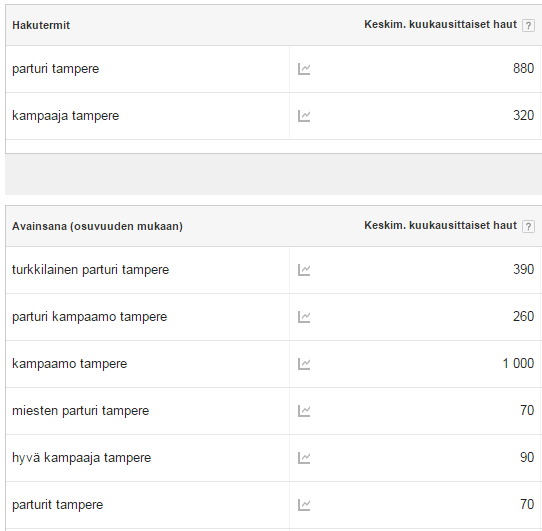
In the example below, the term ”barber” is searched for in Tampere significantly more than, for example, ”hairdresser”. In this case, it might be wisest to optimize the page for the search term ”barber hair salon tampere”.
1.2 Website structure
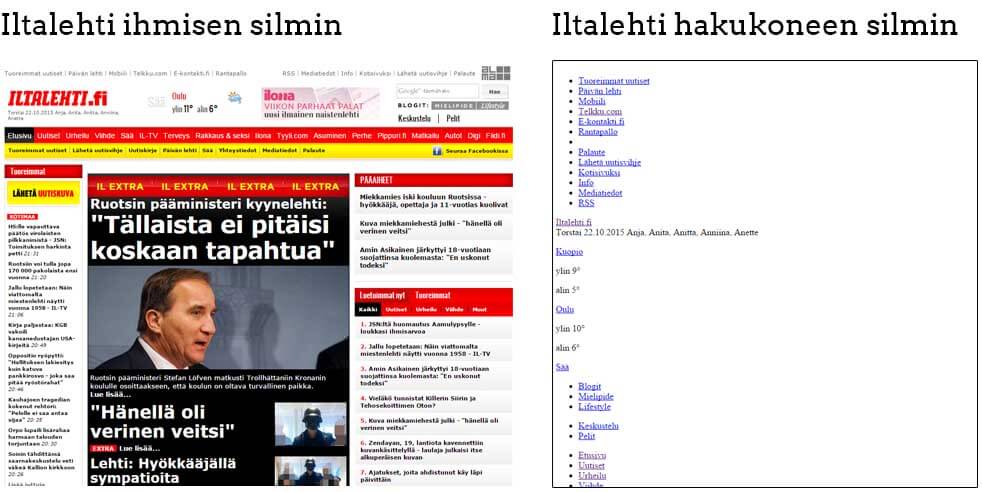
Search engines are visually limited compared to humans. Websites through the eyes of a search engine look very different, as shown in the image below.
To make your website as search engine friendly as possible. For search engines to be able to read your site's content, it is important that the text content is in HTML format. Flash, Java Applets, text inside images, and other similar elements are not indexed by search engines.
Make sure the site's internal navigation is clear.
You should be able to navigate anywhere within the site in a maximum of three link clicks. Well-displayed content is considered of paramount importance. Old news articles and blog posts that get buried under new ones may perform worse in search engines.
Divide each topic into its own subpage.
Do not make so-called ”one-page websites”. The search engine reads and indexes the theme of each subpage and classifies it to cover a specific topic. If there are multiple topics on the same page (e.g., all services crammed onto the same subpage), it is difficult for the search engine to determine what the page is about.
1.3 Subpage content optimization for a search term
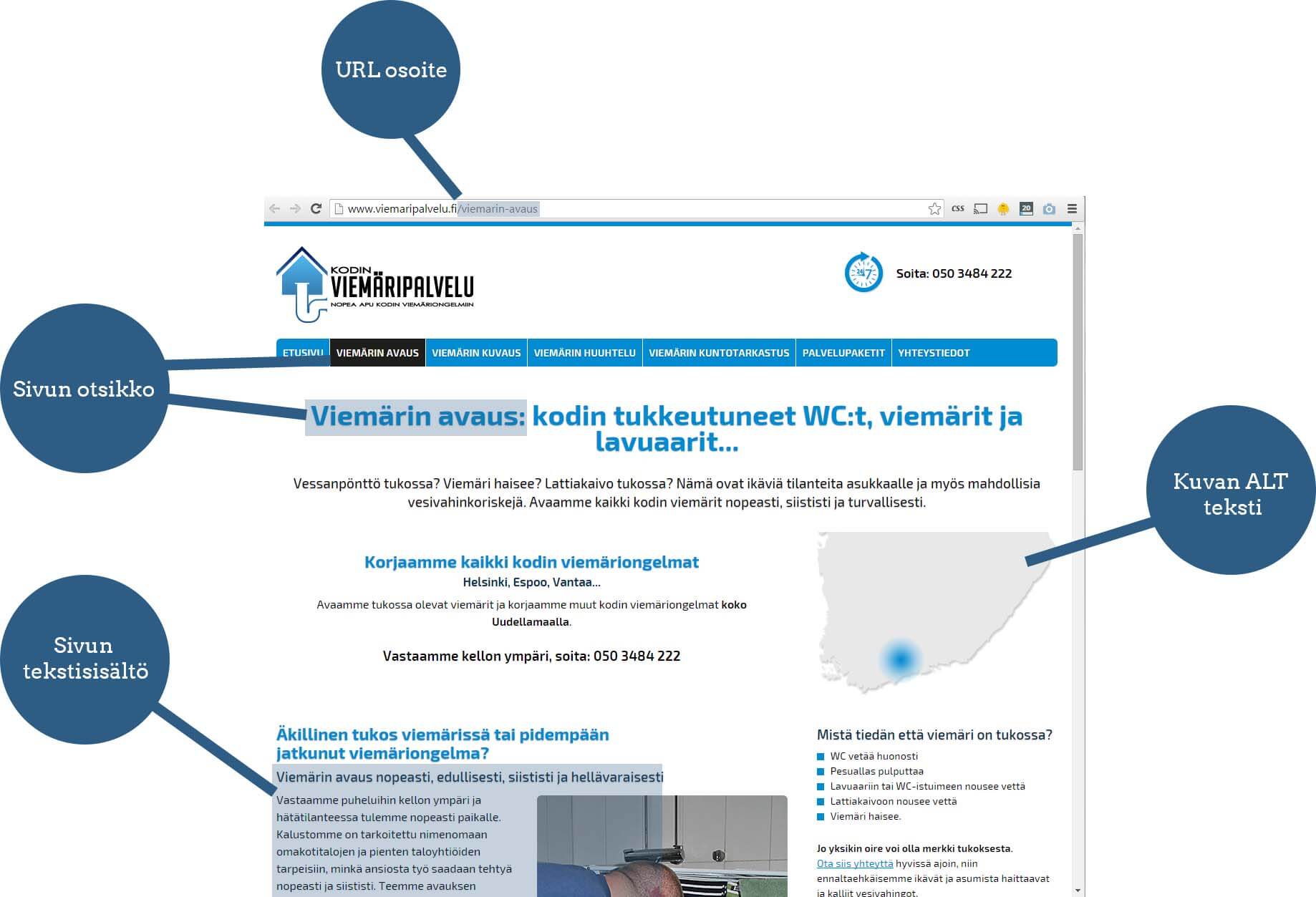
Search engines determine what a page is about based on its text content. Therefore, a subpage must be built and optimized for the target search term from the very beginning. Below is an example of a company whose page is optimized for the search term "drain cleaning". The points are explained in more detail below.
Page URL
The page URL must contain the target search term. This improves the page's visibility for the target search, and bolds the URL in the search results. Users are more likely to click a link that perfectly reflects the search they performed.

Page title
Add the search term to the page's main heading (H1 tag). The page title should be the first piece of text on the page and has a higher weight than the body text. It is recommended that you also use the search term in other heading tags (H2, H3, H4, etc.).
Page text content
Write the page text so that the desired search term appears in it. However, do not "spam". Primarily structure the content so that it is easy for humans to read. Nowadays, search engines (especially Google) understand context and semantics. Try to make the text as readable as possible for humans. Do not optimize the text only for Google.
Create comprehensive text content. Write at least 300 words for each page. According to studies, pages with a lot of text perform better in search results than short pages. There is no maximum word count.
Image ALT texts
An ALT text is a tag placed in the image code that tells the search engine what the image represents. Include the search term in the ALT text.
WordPress search engine optimization
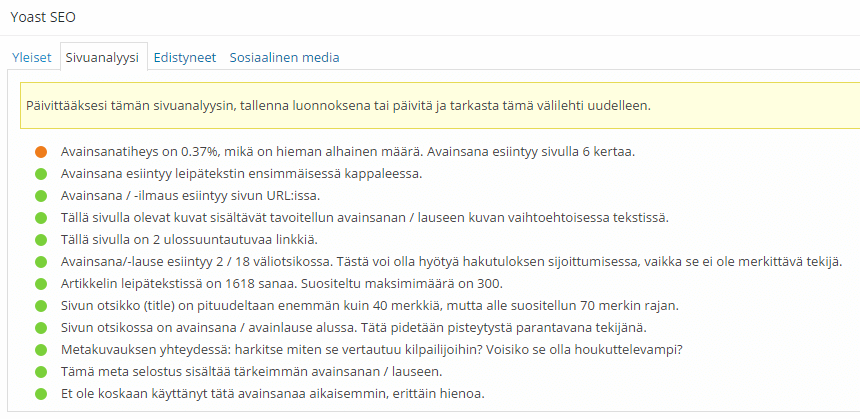
On WordPress sites, the points above are easy to check with the Yoast SEO plugin.
(NOTE: There is a translation error in the image below. "recommended maximum amount..." should be "recommended minimum amount..."
1.4 Linking to external websites
It is recommended that every page has at least one link to an external website. When Google and other search engines try to determine what topic a page is about based on your site's content, they take into account whether the page links to another website that covers the same topic. There is evidence that including external links affects rankings in search results.
A good external link:
- Points to a high-quality website. (A high-quality website can be considered one that is at the top of the search results in its field)
- Covers the same topic area as the target search term of the linking page
- Opens in a new tab (The link contains the HTML code: target="_blank"), meaning the user does not leave your website when clicking the link; instead, the other website opens in a new tab.

1.5 Page metadata affects the appearance of search results
Page meta data consists of snippets of code intended only for search engines. Meta data can be used to define which words the page appears for in search results.
Contrary to popular belief, meta data does not directly affect search engine visibility. However, a well-tailored "ad copy" can influence how many people click on your link in the search results instead of a competitor's.
Meta keywords.
Google no longer considers meta keywords in any way. Bing still uses meta keywords to identify keyword spammers. Therefore, do not use meta keywords in your optimization.
Meta description
The description can be used to specify the text that appears in search results. If the description is missing, search engines will generate it from the site's content. Often, the text generated by the search engine is not a good "ad" for your link.
Include the page's search term in the meta description. This way, the words appearing in the search query will be bolded in the search results.
Below is an example search for ”Hairdresser Helsinki”

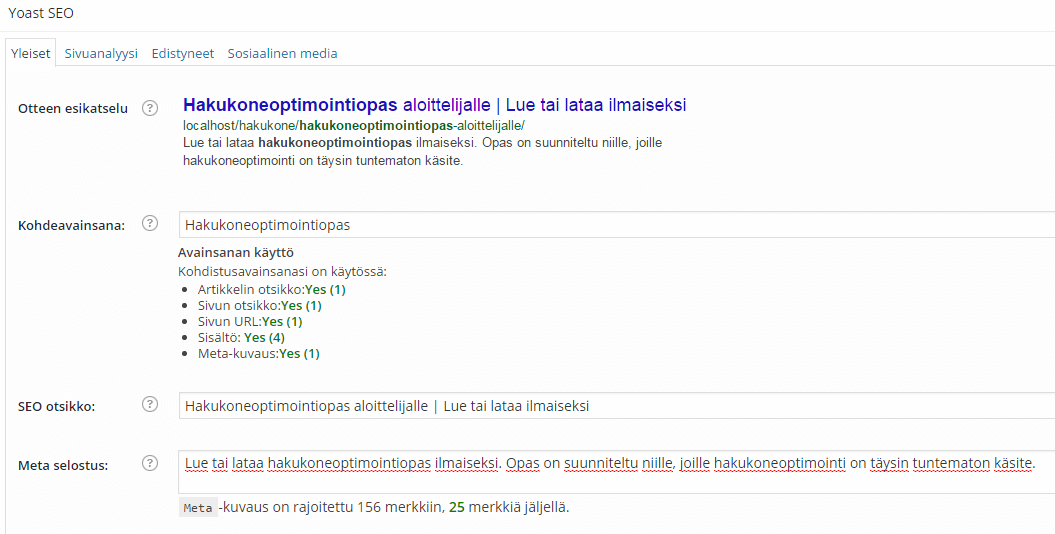
The meta description can be a maximum of 156 characters! If the character limit is exceeded, search engines will cut the text off in the middle. However, try to use all 156 characters or slightly less to make the text look as appealing as possible.
The description text must also appear on the page! In the best-case scenario, the meta description is copied entirely from the page's text. If the description and the site's text are different, the search engine will ignore the specified description and decide it on its own.
Page Title (<title>)
The title does not actually belong to the meta tags, but it still affects the text visible in search results. Include the search term in the page title and make sure the title is at least 40 characters, but no more than 70 characters. A title that is too long will be cut off mid-sentence.
On WordPress sites, meta data and titles are easy to check with the Yoast SEO Tool.
1.6 Beware of copied content!
Search engines love unique content and hate duplicate content. If you decide to copy/quote text from Wikipedia, for example, you probably won't rank very high in search results. Search engines love unique content because it offers the user a new perspective.
Imagine if your competitors could just copy all the texts from your website to their own pages and beat you in search rankings with them. This is one reason why search engines do not consider duplicate content in search engine optimization.
The one who wrote the text first often ranks the best. Copiers end up at the bottom of search results. This happens unfortunately often, especially in online stores. Dozens of retailers copy product descriptions directly from the manufacturer because it is the easiest way. However, this backfires.
NOTE: most AI-written text is duplicate content
AI has no imagination or personal experiences. It writes good text, but it lacks humanity.
E-E-A-T is an acronym used by Google, which stands for Experience, Expertise, Authoritativeness, and Trust.
It means that the content must demonstrate that there is expertise behind it. The information must be accurate and reliable, and sources should be mentioned when necessary.
If you use AI to create content, make sure that you
- Also add your own experiences to the text
- Make the text unique
- If you quote text, always remember to link to the source
1.7 Also watch out for duplicate content within your website
Internal duplicate content on a website is also common. This means the same content is shown in two or more different places. Here are a few of the most common reasons for duplicate content:
- Multiple URL addresses are set for the same page
- Parameters. E.g., sinunyritys.fi?vari=sininen, sinunyritys.fi?vari=punainen
- There is a printable version of the page. E.g., sinunyritys.fi/palvelu and sinunyritys.fi/print/palvelu
- Session IDs. E.g., sinunyritys.fi/palvelu and sinunyritys.fi/palvelu?SESSID=123
- Two or more different domain names point to the website. E.g., sinunyritys.fi and sinunyritys.com
Search engines do not like duplicate content any more than they like copied content. Sometimes, the wrong version of a page might end up in search engine results.
Duplicate content can be easily fixed
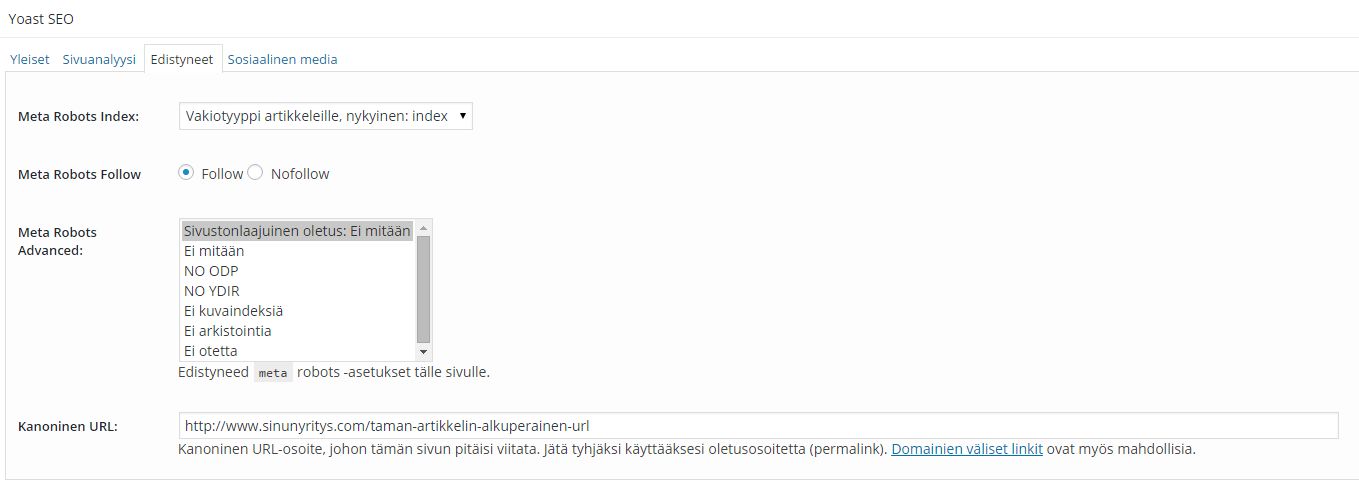
Search engines have adopted a common HTML tag for this problem: Canonical. With the canonical tag, you can indicate to the search engine which version is the one you want to display in search results and which version is a copy. This way, the search engine ignores the copied content and only shows one version of the page in the search results.
WordPress users can easily use the Canonical tag with the Yoast SEO Tool.
Select the "advanced" section from the tabs and enter the correct version of the page or article in the canonical URL field.
1.8 Ensure that websites work on mobile devices.
This is easiest to implement by making the website responsive. This means the page content scales according to the screen. The Tapiokauranen.com website is responsive. If you are on a computer, try resizing your browser window and see how the text size and layout change according to the screen size.
I do not recommend creating separate pages for mobile devices. You can easily create duplicate content by accident. Updating the pages is also more difficult.
In April 2015, Google announced it would reward mobile-optimized websites with better visibility on mobile devices. According to studies, however, no radical changes have been seen in search results as of October 2015. Mobile optimization likely has the greatest impact only on new websites.
You can test how Google evaluates your website's mobile optimization with this tool: Google's Mobile-Friendly and Speed Test
1.9 Page load speed
Search engines have limited resources for crawling the internet. If your site loads very slowly, Google might not be able to index the site at all. Secondly, people also have a short attention span on the internet. Slowly loading pages affect user experience, which indirectly impacts search engine visibility.
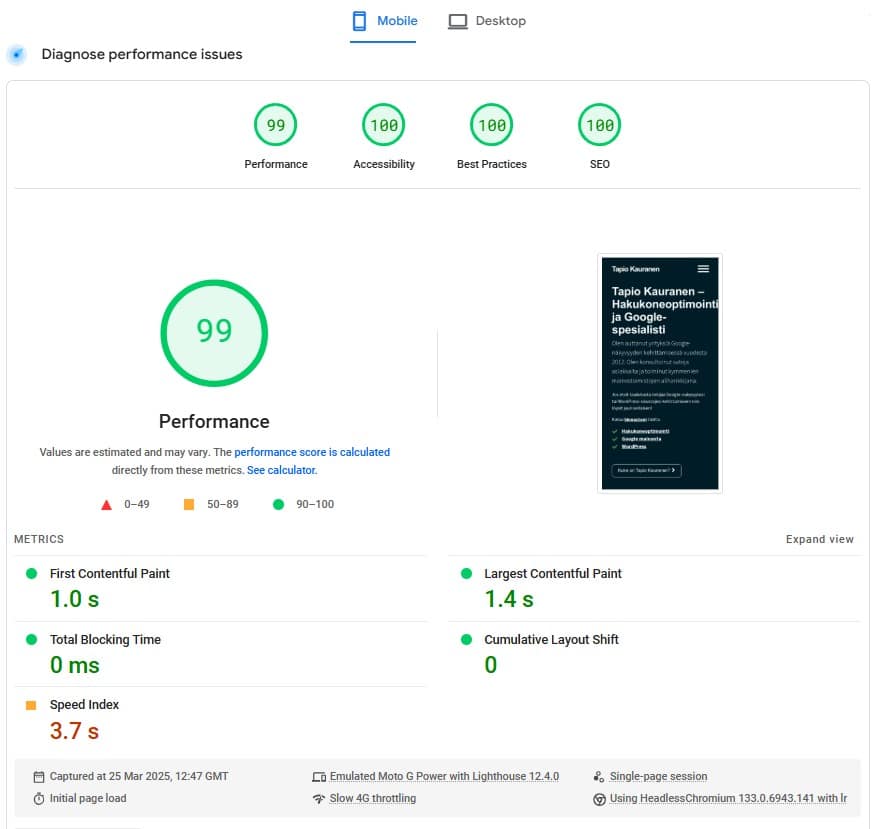
Test your own site's loading speed with Google's own tool: https://pagespeed.web.dev/
The most important metric, "Largest Contentful Paint", should be a maximum of 2.5 seconds. Google claims that 50% of people won't wait for loading speeds of over 3 seconds.
SEO Guide Chapter 2. Off-page SEO
Now that the basics of on-page SEO are in order, we can focus on off-page optimization. Off-page optimization therefore means search engine optimization done on sites other than your own, such as using social media and link building.
2.1 Leveraging social media
Social media can be utilized in search engine optimization mainly by growing the company's and brand's reputation. Have a broad presence on social media channels where your target audience spends time. Share interesting content and gain followers. Over time, as your reputation on social media grows and people get to know your company better, they will start searching for you on search engines. This improves your search engine visibility.
Links from social media do not really improve search engine visibility.
2.2 Link building
Links from external websites are considered by many professionals to be the most important factor in search engine optimization. When it comes to links, quality matters, not quantity. A link from a mega-popular site like Helsingin Sanomat is more valuable than 200 links from shady blogs.
Google's preference is for links to be created naturally. This means a person interested in the site shares the page on social media or, for example, in their blog post. When building links yourself, you must be careful not to create too many links. Links should be built as if they had occurred naturally, created by different users.
2.3 Add your business to Google My Business (Formerly Google Maps for Business)
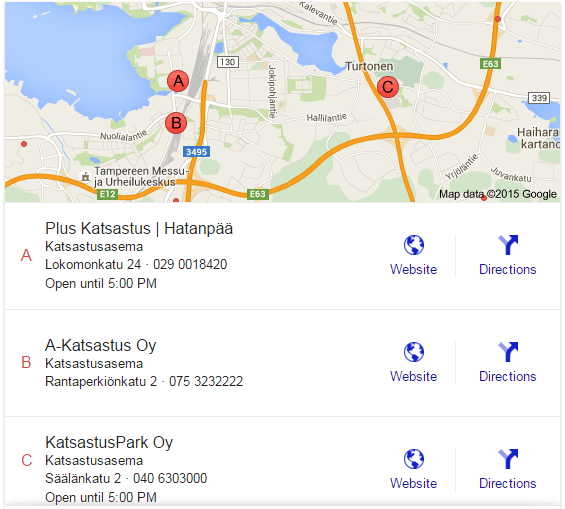
By adding your business to Google's map service you will appear in the map listing when someone searches with keywords related to your industry.
Below is an example of a search for ”katsastus tampere”. The businesses whose websites are at the top of the search results appear highest, i.e., in the best positions, in the map links. If your website has poor visibility on Google, your map link will also have poor visibility.
It is also recommended that you add your most important search term to your business name. For example, if you offer home cleaning services, write ”Home Cleaning | Company Name Ltd” in the business name field in the Google My Business service.
SEO guide final words
Congratulations. You have now read this 2000-word beginner's SEO guide. Is there something on your mind? Do you disagree with something? Please leave your feedback in the comments at the bottom of the page. Please also share the guide with others.
The guide was written by Tapio Kauranen, Google advertising